Most Copilot rollouts stall for the same reason: the technology arrives before the operating model. Licenses get assigned, pilots launch, and then security flags overshared data, legal asks who approved the agent, and finance asks what the return is. Our answer is a four-layer operating model that turns Copilot from a licensed tool into a governed capability. Each layer answers a different question: what data can AI touch, what jobs can agents do, who watches them work, and how do we know it is working. Build the layers in order, and each one makes the next one easier.

Governance is not a tax on AI adoption. It is the operating model that lets adoption scale: clear data boundaries, defined agent roles, proportional oversight, and measured value.
The four layers at a glance
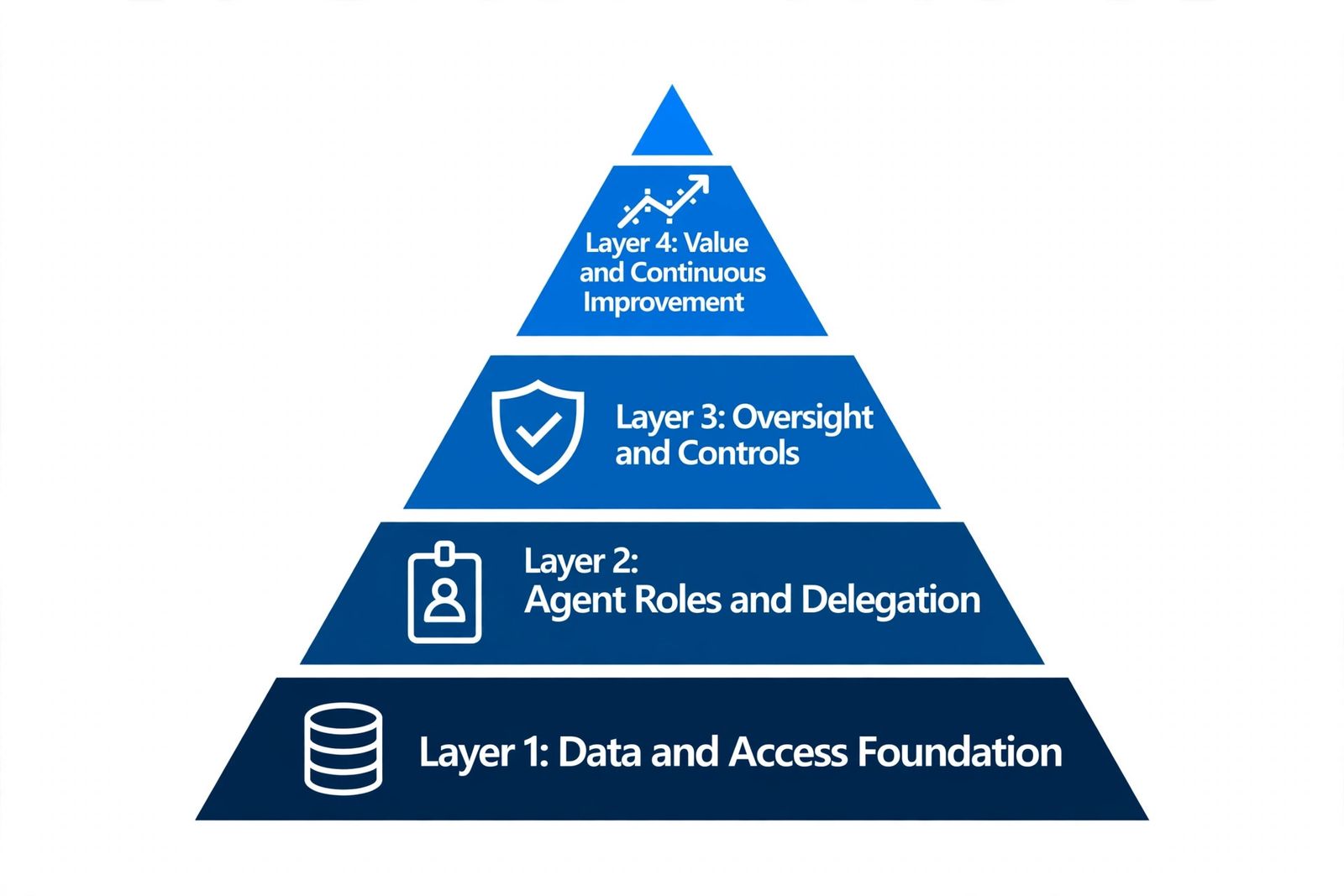
Think of the model as a stack. The bottom layers carry the top ones: you cannot govern agent behavior if the data underneath is a mess, and you cannot measure value if nobody defined the agent’s job. The layers are:
- Layer 1: Data and Access Foundation. What data Copilot and agents can reach, and how it is classified and protected.
- Layer 2: Agent Roles and Delegation. Which jobs agents are allowed to do, who owns them, and how they are built.
- Layer 3: Oversight and Controls. How humans stay in charge: approvals, audit trails, and monitoring.
- Layer 4: Value and Continuous Improvement. How outcomes are measured, costs are managed, and the model keeps getting better.
Layer 1: Data and Access Foundation
What it is
The data layer is the ground truth everything else stands on. Microsoft 365 Copilot does not bypass your permissions: it retrieves data through Microsoft Graph using the signed-in user’s identity, so it can only see what that user can already see. That is reassuring and dangerous at the same time, because most tenants have years of accumulated oversharing. Copilot will faithfully surface content that users technically have access to but were never meant to find. Layer 1 makes the permission reality match the permission intent, then adds AI-specific controls on top.
What to do
- Run a permission hygiene pass before expanding Copilot. Inventory SharePoint sites and OneDrive libraries with broad sharing, and remediate “anyone with the link” sharing on sensitive content. This is the single highest-leverage action in the whole framework.
- Deploy sensitivity labels and get people to use them. Copilot honors labels and encryption: content a user is not entitled to see stays out of responses. Labels travel with the data, so they protect content wherever Copilot encounters it.
- Create DLP policies for the Microsoft 365 Copilot and Copilot Chat location. In the Microsoft Purview portal, use a Custom policy template (the only template that exposes this location) to block sensitive information types in prompts, block web search grounding when prompts contain sensitive data, and exclude labeled files and emails from being used in responses. Note that updates to these policies can take up to four hours to take effect.
- Turn on Data Security Posture Management (DSPM) for AI in Purview. It shows which AI tools are in use, when sensitive content is accessed or referenced by AI, and where exposure risk is concentrated, so you can act before an incident.
Common failure mode
Skipping the hygiene pass. The pilot goes fine with a small, trusted cohort, then the broad rollout lets Copilot quote a salary spreadsheet to the wrong audience. The result is a trust crisis that pauses the program for months. Every week spent on permission hygiene in Layer 1 saves a month of damage control later.
Layer 2: Agent Roles and Delegation
What it is
Once the data is trustworthy, decide what agents are allowed to do with it. Every agent gets a defined role: a job description, explicit knowledge sources, permissions, handoffs to humans, and a named business owner accountable for its outcomes. This layer also covers where agents get built, because the build surface determines how much governance you get by default.
What to do
- Write a role card for every agent. Job to be done, data it may touch, actions it may take on its own, actions that need approval, the human it escalates to, and the owner who accepts the risk. No role card, no deployment.
- Match the build surface to the stakes. Use Agent Builder in Microsoft 365 Copilot for lightweight team agents built on organizational knowledge; these are managed in the Microsoft 365 admin center, where admins can view the agent inventory and metadata, and enable, disable, assign, block, or remove agents. Use Copilot Studio for departmental or enterprise agents that need multi-step workflows, custom connectors, or external publishing; these are managed in the Power Platform admin center with environment-level DLP policies, connector governance, and application lifecycle management across dev, test, and production environments.
- Scope each agent’s knowledge explicitly. Do not let an agent inherit a user’s entire access. Least privilege applies to agents as much as to people.
- Route makers into governed environments. In the Power Platform admin center, use environment routing so new makers land in a controlled environment instead of the permissive default, and require admin approval before agents are published broadly.
Common failure mode
Orphaned agents: built by someone who has since moved on, with broad access, no owner, and no record of what they were meant to do. When something goes wrong, nobody can answer for the agent. The role card and the admin-center inventory exist precisely to prevent this.
Layer 3: Oversight and Controls
What it is
Oversight is how humans stay in charge while agents do the work. The principle is proportionality: the heavier the consequence of an action, the stronger the control around it. Low-risk work like drafting and summarizing can run with logging and spot checks. Medium-risk work like sending customer communications or updating records needs human approval workflows. High-risk work like financial transactions, HR decisions, or external commitments needs a human in the loop by design, not by policy document. Layer 3 turns those tiers into running controls, not slideware.
What to do
- Define the oversight tiers before deployment, then instrument for them. Every agent action should be attributable to the agent, the user, and the data it touched. A growing backlog of approvals is a first-class operational metric: it signals the agent’s scope or the process needs redesign.
- Manage the agent lifecycle in the admin centers. In the Microsoft 365 admin center, review the agent inventory and Integrated Apps controls: allow, block, or remove agents, and restrict sharing so agents reach only their intended audiences. In the Power Platform admin center, enforce connector policies that govern data flows between the systems your Copilot Studio agents touch.
- Apply Purview compliance to agent interactions. Audit logging, eDiscovery, and retention policies cover agent prompts and responses, so you can investigate what an agent did and detect non-compliant usage after the fact.
- Exclude untrusted content from grounding. Use the DLP policy location for Microsoft 365 Copilot and Copilot Chat to exclude external email from being used for grounding and summarization (in preview). Because only the sender domain is evaluated, this is a cheap, effective guard against prompt injection carried in outside messages.
- Monitor continuously. Use the Copilot Dashboard for analytics on usage and performance, and the agent usage reports in the Microsoft 365 admin center to see which agents are actually being used and by whom.
Common failure mode
Two opposite mistakes. The first is setting every action to require approval, which buries reviewers and trains everyone to click through without reading. The second is deploying with no audit trail, which means the first incident becomes an unanswerable question. Calibrate the tiers to consequence, and make sure the logs exist before you need them.
Layer 4: Value and Continuous Improvement
What it is
The top layer closes the loop: it proves the lower layers are worth it and tells you how to adjust them. Value is measured in work outcomes, not tool activity. License counts and prompt totals describe adoption; they say nothing about whether the business is better off. Layer 4 pairs outcome metrics with control metrics, manages the cost of the program, and feeds what you learn back into layers 1 through 3.
What to do
- Define outcome metrics per agent before it launches. Cycle time reduced, cases resolved without escalation, error rates, cost per transaction. Pair them with control metrics: approval rates, override rates, incident counts.
- Review the numbers on a cadence. Monthly is a good default. Retire agents that do not earn their keep, and expand the ones that do. Each cycle should make the next deployment cheaper and faster; if it does not, the operating model is the bottleneck, not the technology.
- Manage consumption deliberately. Choose between per-user licenses and pay-as-you-go metering based on actual usage patterns, and track spend so costs can be attributed to the business units that benefit.
- Feed findings back down the stack. Evidence of safe, valuable behavior is what justifies expanding an agent’s permissions. Incidents and near-misses are what justify tightening labels, DLP rules, or oversight tiers. The model improves because the top layer talks to the bottom ones.
Common failure mode
Reporting adoption as value. A dashboard full of active users and prompt counts looks like success until finance asks for the return and nobody has an answer. Renewals then happen on faith, and the first budget squeeze kills the program. Define the outcome metrics up front, when it is cheap, not at renewal time, when it is not.
Putting the layers to work
You do not need all four layers perfect on day one. Start with Layer 1 on a single business unit: hygiene pass, labels, one DLP policy for the Copilot location. Add Layer 2 by writing role cards for the first two or three agents and choosing the right build surface for each. Stand up Layer 3 with tiered oversight and the admin-center inventories. Then let Layer 4 tell you what to fix next. Our team typically sees the full loop running within one quarter for a focused scope, and that working loop becomes the template for the rest of the organization.
Frequently asked questions
How long does it take to stand up the four layers?
For a focused scope, one quarter is realistic. Layer 1 is the long pole: the permission hygiene pass takes as long as your SharePoint sprawl dictates. Layers 2 and 3 can move in parallel once the first role cards are written, and Layer 4 starts producing signal as soon as the first agents go live with outcome metrics defined.
Do we need Copilot Studio, or is Microsoft 365 Copilot enough?
Start with Microsoft 365 Copilot and Agent Builder for team-level agents grounded in organizational knowledge; they are simpler to govern through the Microsoft 365 admin center. Move to Copilot Studio when agents need multi-step workflows, custom connectors, external publishing, or formal lifecycle management across dev, test, and production. Many organizations run both, matched to the stakes of each use case.
What licensing do the Purview controls in this framework require?
It depends on the control. The DLP policies for the Microsoft 365 Copilot and Copilot Chat location, sensitivity labels, and Data Security Posture Management for AI each have their own plan requirements. Check the licensing section of each Microsoft Learn article linked below before you plan the rollout, and confirm which enterprise data protection commitments apply to your subscription plan.
How does the framework handle shadow AI?
Two ways. First, Layer 2 makes the governed path the easy path: approved build surfaces, simple intake, and visible templates remove the incentive to go rogue. Second, Layer 1 discovery controls find what slipped through anyway: DSPM for AI shows which AI tools are in use and where sensitive data is exposed, and endpoint DLP can warn users or block them from pasting sensitive data into public chatbots.
Who should own each layer?
Ownership is shared but clear. Layer 1 belongs to IT and security working with data owners. Layer 2 belongs to the business owners of each agent, supported by the platform team. Layer 3 belongs to security and compliance, with business owners accountable for their agents’ behavior. Layer 4 belongs to business owners with finance. A small AI governance council, meeting monthly, keeps the four layers aligned and resolves the conflicts between speed and control.
Microsoft resources on Copilot governance
The Microsoft Learn and Microsoft documentation behind this framework, verified live:
- Data protection in Microsoft 365 Copilot: how Copilot respects permissions, sensitivity labels, and DLP through Microsoft Graph (Microsoft Learn)
- Enterprise data protection in Microsoft 365 Copilot: contractual commitments on prompts, responses, and model training (Microsoft Learn)
- Microsoft Purview DLP for Microsoft 365 Copilot: blocking sensitive prompts, files, and external email from Copilot processing (Microsoft Learn)
- How Microsoft Purview secures AI data: DSPM for AI, labels, DLP, and insider risk for AI interactions (Microsoft Learn)
- How Microsoft 365 Copilot works: grounding, Microsoft Graph, and the permission model (Microsoft Learn)
- Choose between Agent Builder and Copilot Studio: governance principles and admin controls for each build surface (Microsoft Learn)
- Security and governance for agents in Microsoft 365 Copilot: data protection and governance at scale for agents (Microsoft Power Platform Blog)
Ready to put the four layers to work?
Bring your Copilot rollout, or the one you are planning. Our team helps you stand up the operating model: data foundation, agent roles, oversight controls, and the metrics that prove value.
One Response